
User`s guide





Making a Return Loss Measurement Getting Started with Return Loss
Agilent 81610A/11A/12A/13A/14A Return Loss Module, Fifth Edition 29
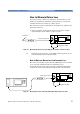
or Figure 21 if you are using an internal source
(Agilent 81611A/2A/3A/4A Return Loss modules only).
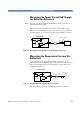
Figure 21 Measuring the Power Transmitted through the Measurement Patchcord -
Internal Source
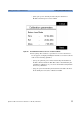
2 Move to the Power Sensor channel:
– Press [Menu].
– If necessary, move to <Pwr unit>, move to <dB> and press Enter.
– The Power Sensor channel displays a power value in dB that is
equal to the front panel delta of the measurement system.
– Press [Close] to exit from the menu.
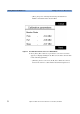
3 Move to the Return Loss module channel:
– Press [Menu], move to <FPDelta>, press [OK]
– Enter the power value in dB, [P], displayed by the power sensor,
as the front panel delta, then press [OK].
– Press [Close] to exit from the menu.
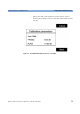
Termination Calibration using the Measurement
Patchcord
Use this procedure to calibrate the Return Loss module against a
terminated patchcord, that is when there are no reflections returning
from its end.
1 Making sure all the connectors are clean, set up the instrument as
shown in Figure 22
Sensor
8161x
Power
8163A Lightwave Multimeter
measurement patchcord
Termination
8161x 8163A Lightwave MultimeterLaser
Source
measurement patchcord
Agilent 81113PC