
User`s guide






Performance Test Instructions Performance Tests
Agilent 81610A/11A/12A/13A/14A Return Loss Module, Fifth Edition 73
Calibrating the 81610CC Reference Cable
The 81610CC Reference Cable may be recalibrated using this
procedure. Repair is not possible.
1 Make sure that all cable connectors are clean.
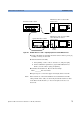
2 Setup the equipment as shown in Figure 42.
Make sure that the ouptut port of the Attenuator has a straight
connector. Clean this connector very carefully, and connect it to the
straight end of the 81610CC Reference Cable.
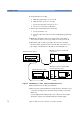
Figure 42 81610CC Reference Cable - Initial Setup
3 At the Laser Source module,
a Enable the Laser Source
b Set the wavelength [
λ]
to 1310 nm
c Press [Mod Src] and select <Coherence Ctrl> to modulate the
source using coherence control.
NOTE Allow the Laser Source to stabilize for at least 20 minutes.
4 At the Attenuator, set the ‘Wavelength’ to the wavelength of the
Laser source.
5 At the Power Sensor module,
a Set the wavelength [λ] to the wavelength of the Laser Source.
b Set [Pwr unit] to <dB>.
81610CC
Optical Attenuator 8156A
8156A #101
Mainframe 8163A w/ 8161xA RTL
and 81634A Power Sensor
8163A
8161xA
in
out
81634A
Mainframe 8163A w/ 81654A FP
Laser Source
8163A
81654A
Polarization Ctrl 11896A
11896A