
DVD/CD Flash Copy Tower Manual






www.aleratec.com
10
Using the DVD/CD Flash Copy Tower
Checking the Device Information
Before copying, it is recommended that you check each Memory Card, USB, or
DVD/CD’s content information.
Checking Memory Card Information
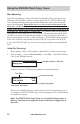
1. Select 3.Information, → Select 1.M-Cardinfo → Press OK → The DVD/CD
Flash Copy Tower will show the information of this Memory Card.
Press “ESC” or “OK” to continue to calculate le quantity.
Checking USB Information
1. Select 3.Information, → Select 2.USBinfo → Press OK → The DVD/CD Flash
Copy Tower will show the information of this USB ash drive.
Press “ESC” or “OK” to continue to calculate le quantity.
SD 3838MB
Used: 1438MB
Total File Q’ty:
64
USB 7.0GB
Used: 5.0GB
Total File Q’ty:
4329