
DVD/CD Flash Copy Tower Manual





www.aleratec.com
15
Using the DVD/CD Flash Copy Tower
USB to Disc
1. Insert a USB ash drive and place a blank DVD or CD disc into the burner.
2. Select 1.Copy, → Select 2.USBtoDisc → Press OK → The DVD/CD Flash Copy
Tower will begin copying.
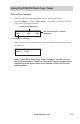
The DVD/CD Flash Copy Tower will detect the USB ash drive and decide whether
Multisession or Disc Spanning copying will be used.
DiscSpanningCopying
Example: A total of 4 CD-R discs are required to complete this project
When a disc is nished copying, it will be ejected. If the Disc Spanning process is
not complete, the DVD/CD Flash Copy Tower will prompt you for a new blank disc
to continue the copying.
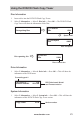
MultisessionCopying
When nished copying, the disc will be ejected, and you can continue to copy
another Memory Card, or USB ash drive.
Total = 2034
Waiting disc...
Number of files on USB flash drive
Write D1/4 601 M
Total 5401MB 80M
First Disc
Current disc size
Copying progress
Total size to be copied
Total = 64
Waiting disc...
Number of files on USB flash drive
Write Disc 137 M
16% 20M
Total size to be copied
Copying progress