
DVD/CD Flash Copy Tower Manual





www.aleratec.com
16
Using the DVD/CD Flash Copy Tower
Disc to Disc
This function allows you to copy DVD to DVD(s) and CD to CD(s).
Note: CD will copy only to CD. DVD will only copy to DVD.
1. Place your source disc into a Reader, and blank discs into Writers.
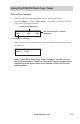
2. Select 1.Copy, → Select 3.DisctoDisccopy → Press OK → The DVD/CD Flash
Copy Tower will begin copying.
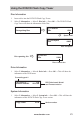
3. When copying is completed, the copied disc will be ejected.
Copy 0:15 73: 56
3% 16X 07:21
Elapsed Time
% Progress
Copy speed
Total information
on disc
Copy Result
PASS 1 FAIL 0
Results