
DVD/CD Flash Copy Tower Manual





www.aleratec.com
21
Using the DVD/CD Flash Copy Tower
Disc Information
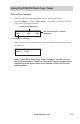
1. Insert a disc into the DVD/CD Flash Copy Tower.
2. Select 3.Information, → Select 3.Discinfo → Press OK → The DVD/CD Flash
Copy Tower will show the information of this Disc.
Discspanningdisc
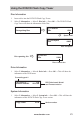
Drive Information
1. Select 3.Information, → Select 4.Driveinfo → Press OK → This will show the
information of the DVD burner.
System Information
1. Select 3.Information, → Select 5.Systeminfo → Press OK → This will show the
information of this DVD/CD Flash Copy Tower version.
Recognizing Disc
[1] Free Space
Disc 420M
Disc free space
[2] Disc 2/4
Disc 512M
Disc content size
[1] 1 Session
Disc 87M
Space used
[#1] Port 1.0 1.23
Pioneer DVDRW.. VR-112D
Connecting port #
DVD Drive brand, Model
and Firmware version
Copy Tower V1.20
Version number