
Installation Instructions



- 4 - T1RM3F4(D)V Installation Guide
Assembling and Attaching
Z Bracket Wire Management Accessory (included):
Altronix Trove Rack enclosures include Z Bracket, a convenient and reliable wire management accessory.
Hardware (included):
Ten (10) bolts and eight (8) lock nuts.
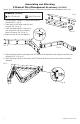
1. Carefully unpack Z Bracket. Do not discard hardware
(included) (Fig. 3, pg. 4).
2. Attach arms to each other using bolts and
lock nuts (Fig. 3a, pg. 4).
3. Attach the hinge brackets to the ends of
arms using bolts and nuts positioning
them as shown on (Fig. 3b, pg. 4).
4. Make sure that all nuts are tightened.
5. Attach the hinge bracket on the longer side of Z Bracket to the adjustable slide using bolts and lock nuts
(included) (Fig. 4, 4a, pg. 4).
6. Attach the hinge bracket on the shorter side of Z Bracket to the rear of the rack enclosure using bolts
(included).
Fig. 4
Fig. 4a
Fig. 3b
Two (2)
Fig. 3
Fig. 3a