
Installation Instructions



T1RM3F4(D)V Installation Guide - 5 -
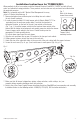
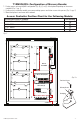
T1RM3F4(D)V: Configuration of Mercury Boards:
1. Fasten spacers onto metal pems configuration (A), (B), (C) or (D) of backplane depending on the access
controller (Fig. 5, pg. 5).
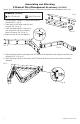
2. Position access controller module over corresponding spacers and fasten screws into spacers (Fig. 5a, pg. 5).
3. Mount backplane to enclosure with hardware.
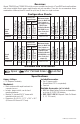
Access Controller Position Chart for the Following Models:
Mercury/LenelS2 Access Controller Pem Mounting
LP1502, MR52, MR16IN, MR16OUT
A
LP2500, MUX8
B
LP1501, MR62e
C
MR50
D
Fig. 5
Altronix PDS8(CB)/VR6
OUT1
OUT2 OUT3 OUT4 OUT5 OUT6 OUT7 OUT8
1 2 3 4 5 6 7 8
Common Power Outputs (NEG)
P
N
+ INP1 - + INP2 -
PWR1+
PWR2+
COM(-)
PWR1+
COM(-)
P
N
PWR1+
Altronix ACM4(CB)
--- +
Control
--- +
Power
NO C NC
FACP
INTERFACE
+ INP --- T + RET ---
TRG
TRIGGER
INPUT
IN GND
1
NC C NO COM
OUTPUT 1
NC C NO COM
OUTPUT 2
NC C NO COM
OUTPUT 3
NC C NO COM
OUTPUT 4
IN GND
3
IN GND
4
IN GND
2
ACM4
ACCESS POWER
CONTROLLER
RoHS
MAIN
Altronix
eFlow6NB
AC
L G N
DCAC1
1 min
enable
2 hr.
disable
OFF - 24V
ON - 12V
ON
TRIGGER EOL
SUPERVISED
--- BAT + --- DC +
NC C NO
AC FAIL
NC C NO
BAT FAIL
+ AUX ---
NO GND
RESET
VR6 is mounted
under PDS8(CB)
A
C
D
D
C
B
B
A
To IEC connector
To LED lense
Pem
Spacer
Backplane
Pan Head Screw
Mercury Board
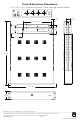
Fig. 5a
Altronix
eFlow6NBV