
User manual

Version 1.10 ©Copyright 2013, Ambient LLC. All Rights Reserved. Page 7
Press the + key or MIN/MAX key to adjust the time zone from -12 to 12, based on the
number of hours from Coordinated Universal Time, or Greenwich Mean Time (GMT).
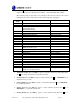
The following table provides times zones throughout the world. Locations in the eastern
hemisphere are positive, and locations in the western hemisphere are negative.
Hours from
GMT
Time Zone
Cities
-12
IDLW: International Date Line West
---
-11
NT: Nome
Nome, AK
-10
AHST: Alaska-Hawaii Standard
CAT: Central Alaska
HST: Hawaii Standard
Honolulu, HI
-9
YST: Yukon Standard
Yukon Territory
-8
PST: Pacific Standard
Los Angeles, CA, USA
-7
MST: Mountain Standard
Denver, CO, USA
-6
CST: Central Standard
Chicago, IL, USA
-5
EST: Eastern Standard
New York, NY, USA
-4
AST: Atlantic Standard
Caracas
-3
---
São Paulo, Brazil
-2
AT: Azores
Azores, Cape Verde Islands
-1
WAT: West Africa
---
0
GMT: Greenwich Mean
WET: Western European
London, England
1
CET: Central European
Paris, France
2
EET: Eastern European
Athens, Greece
3
BT: Baghdad
Moscow, Russia
4
---
Abu Dhabi, UAE
5
---
Tashkent
6
---
Astana
7
---
Bangkok
8
CCT: China Coast
Bejing
9
JST: Japan Standard
Tokyo
10
GST: Guam Standard
Sydney
11
---
Magadan
12
IDLE: International Date Line East
NZST: New Zealand Standard
Wellington, New Zealand
3. 12/24 Hour Format. Press the SET key again to adjust the 12/24 hour format setting. Press
the + key to change between 12 hour and 24 hour format.
4. Change Hour. Press the SET key again to set the hour. Press the + key or MIN/MAX key to
adjust the hour up or down.
5. Change Minute. Press the SET key again to set the minute. Press the + key or MIN/MAX
key to adjust the minute.
6. Change Year. Press the SET key again to set the calendar year. Press the + key or
MIN/MAX key to adjust the calendar year.
7. Change Month. Press the SET key again to set the calendar month. Press the + key or