
Quick Installation Guide
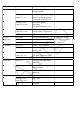

LED Indicator Status Description Remark
Power/Status ON Green System boot up ready and
working normally
Flashing Green
(Interval : 1 sec)
1.System boot up progressing
2.Reset to default progressing
(after push reset button 5s)
Flashing Green
(Interval : 0.5 sec)
Mesh system pairing
progressing
(after push WPS button 1 sec)
Flashing Green 30 sec
(Interval : 0.1 sec)
To identify which physical unit
in mesh system (Trigger LED)
OFF System shut down/ power OFF
Internet
(Dual-color)
ON Amber LTE network connection If mixed-color needed,
Amigo will not guarantee
the performance.
ON Green Ethernet network connection
OFF No network connection
Wi-Fi/WPS ON Green Wireless radio is enabled
Flashing Green Traffic is passing through
Wireless LAN
Flashing Green
(Interval : 1 sec)
WPS function is enable
(after push WPS button 5 sec)
OFF Wireless radio is disabled
WAN/LAN ON Green WAN/LAN Ethernet cable is
connected
Flashing Green Traffic is passing through
WAN/LAN port
OFF WAN/LAN Ethernet cable is not
connected
4G Signal Strength
ON Green Good Signal
Flashing Green
(Interval : 1 sec)
Poor Signal
OFF NO Signal