
User's Manual
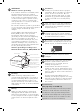

6
HOW TO USE THE OWNER’S MANUAL ON THE CD-ROM
To view the Owner’s Manual on the CD-ROM, Adobe Acrobat Reader must be installed
on your PC. The “ACRORD” folder on the CD-ROM contains the installation programs
for them. If you want to install those programs, Open the “My Computer” J Open the
“LG” J Open the “ACRORD” J double-click your language.
TO VIEW THE OWNER’S MANUAL ON THE CD-ROM
The Owner’s Manual fi les are included in the supplied CD-ROM.
Load the supplied CD-ROM into the CD-ROM drive of your PC.
After a while, the web page of the CD-ROM will open automatically. (for Window only)
When you click,
display the PDF fi le.
You can fi nd the
desired contents
easily using the
bookmark.
NOTE
D If the web page does not appear automatically, open the Owner’s Manual fi le
directly.
Open the “My computer” J Open the “LG” J Open the “index.htm” fi le.
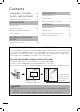
Contents
WARNING / CAUTION ............2
SAFETY INSTRUCTIONS ........3
Important Safety Instructions ...................3
PREPARATION
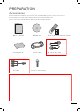
Accessories ....................................................7
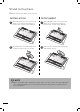
Stand Instructions ........................................8
Desktop Pedestal Installation ....................9
Swivel Stand ..................................................9
EXTERNAL EQUIPMENT
SETUP
Connecting Your TV ...................................10
WATCHING TV
Turning on the TV ....................................... 11
Initial Setting ................................................ 11
On-Screen Menus Selection ................... 12
APPENDIX
Troubleshooting .......................................... 13
Maintenance ................................................ 15
Open Source Software Notice ................ 16
Product Specifi cation ................................18