
User manual




4
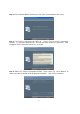
Step 4: The Installation Wizard will come up. Click “Next” on the bottom of this screen.
Step 5: The License Agreement will come up. Please read the License Agreement
carefully. To install the Dino-Lite Plus and Pro you must accept the agreement. After
reading the License Agreement, click “Yes” to accept.
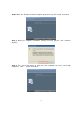
Step 6: When the “Choose Destination Location” screen comes up, select “Browse” to
choose your own destination folder for program installation. Click “Next” to continue.