
Operating instructions




62
Example: Set the position of the MAIN On-Screen information to the middle of the monitor.
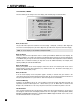
• Enter the Setup (section 7.1). Go to ‘10. DISPLAYS/TIMEOUT’ and press SELECT.
•Press the button until you reach ‘c. MAIN OS POS’N: Bottom’.
• Use the buttons to change to ‘Middle’.
•When finished, press to go to another menu item, or...
•Press BACK to leave the submenu and return to the main menu.
7. SETUP MENU continued …