
Installation Guide

3
User Manual
www.AvantcoRefrigeration.com
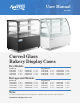
Curved Glass Bakery Display Cases Curved Glass Bakery Display Cases
Installation
Structure and Components
Before Installation
•
If the unit has recently been transported on its side, please let unit stand upright for a minimum of 24 hours
before plugging it in.
•
Make sure that the unit has reached the desired temperature before loading the unit with products. This unit is
meant for keeping cold products cold, not chilling warm products.
•
Make sure that there is proper ventilation around the unit in the area where it will operate.
•
Make sure all accessories are installed (i.e., shelves, shelf clips, casters) before plugging in the unit.
•
Do not attempt to remove or repair any component of the unit. Consult an authorized service technician for
servicing/repair.
•
Do not sit inside the unit or hang on doors.
•
This unit should be located away from doors, air ducts, and fans that could disrupt airflow and negatively
impact performance.
•
Please read through the manual in its entirety.
This unit is intended for use in a temperature-controlled environment of less than 75°F and 55% relative
humidity. Malfunction due to improper conditions is not covered under warranty.
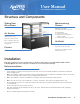
Adjustable height to
accommodate various goods.
For adjustment:
1. Take out the shelf.
2. Move the shelf support to
suitable height.
3. Put the shelf on the supports.
(Refrigerated only)
Never block the air outlet.
Allows the circulating cold air
inside to flow out.
(Refrigerated only)
Never block the suction.
Air is sucked in and cold
air is circulated inside the
refrigerator.
Merchandising
Shelves
Sliding Rear
Glass Doors
Air Outlet
Air Suction
Casters