
Installation Guide

5
User Manual
www.AvantcoRefrigeration.com
Curved Glass Bakery Display Cases Curved Glass Bakery Display Cases
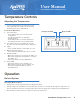
Adjusting the Temperature
Temperature Controls
•
Your new refrigerator is already factory-set to
run at optimum temperatures for food safety
and should require no adjustments.
1.
Set temperature:
- Press "SET" button, the set temperature
is displayed.
- Use the arrow buttons to adjust the
displayed value.
- Press "SET" button to exit the adjustment
and display the unit's current temperature.
2.
If no buttons are pressed within 10 seconds,
the unit's current temperature will be displayed.
3.
Lights:
- Press "LIGHT" button to turn lights on or o.
4.
Manual start/stop defrost:
- Press and hold "LIGHT" button for 6 seconds.
5.
Refrigerant LED:
- When the compressor is running, the LED is on.
- When the refrigerator temperature is constant,
the LED is o.
- During the delay start, the LED flashes.
6.
Defrost LED:
- During the defrost cycle, the LED is on.
- When defrost cycle is done, the LED is o.
- During the delayed display of defrost,
the LED flashes.
Front Panel Operation
Defrost System
Operation
•
Refrigerator coils are kept below the freezing point (32°F).
•
During compressor downtime, the evaporator fan continues to circulate air through the evaporator coil.
This air circulation raises the coil temperature above the freezing point, melting any accumulated frost.
•
Run-o water is drained into the evaporator pan and evaporated.
Automatic Defrost Cycle
Refrigerant LED Defrost LED