
Specifications



56 Implementing UPS Configurations with Microsoft Cluster Server
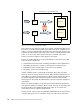
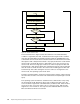
Figure 54. Double UPS flowchart
The flowchart shown in Figure 54 has three branches. The UPS On Battery
condition is signaled by the UPS. PowerChute PLUS recognizes this condition
and starts the UPS.CMD command file with the parameter UPSOnBattery. The
command file sets the node status to Node Paused. Then a branch block contains
three queries with a delay between them. If any query delivers the result that the
remote node is not Node Up, then it is impossible to move any resource to the
remote node. Therefore all groups will be set to offline except quorum disk and
Cluster Group. If both queries deliver the result that the remote node is Node Up,
then all resources will be moved to the remote node including quorum disk and
Cluster Group. After either setting the resources offline or moving them to the
remote node, the operating system shuts down.
The delay is implemented to ensure that if both systems start the script at exactly
the same time, the state of the other node is detected correctly during the second
query.
The operating system shutdown is started from the command file, not by using
the PowerChute PLUS Shut Down Server action. When using this action, the
server would be stopped after a maximum delay of 300 seconds. Since the time
necessary to take a resource offline or move a resource varies, 300 seconds
might be too short. Therefore, the script uses the SHUTGUI.EXE tool from the
Microsoft Windows NT Resource Kit CD.
UPS On Battery abnormal
condition
On Battery Delay in PC+
run UPC.CMD UPSOnBattery
set local node to PAUSED
Delay
move Cluster Groups
shut down Windows NT 4.0
yes
no
yes
no
set Cluster Groups to offline
if remote
node "Up"
if remote
node "Up"