
User`s manual

User Manual version 2305
APOLLO 120/150 IV
7-114
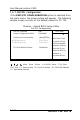
: Move Enter : Select +/-/PU/PD: Value F10: Save
ESC: Exit F1: General Help F5: Previous Values F6: Fail-Safe Defaults
F7: Optimized Defaults
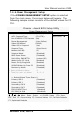
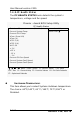
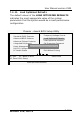
7.4.7. PnP/PCI Configuration
If the PNP/PCI CONFIGURATION option is selected from
the main menu, the screen below will appear. The following
sample screen consists of the default values for PC 710.
Phoenix - Award BIOS Setup Utility
PnP PCI Configuration
Item Help PnP OS Installed (No)
Reset Configuration Data (Disabled)
Resources Controlled By (Auto(ESCD))
x IRQ Resources Press Enter
x DMA Resources Press Enter
PCI/VGA Palette Snoop (Disabled)
Menu Level
Select Yes if you
are using a Plug
and Play capable
operation system.
Select No if you
need the BIOS to
configure a
non-boot device