
User`s manual


User Manual version 2305
APOLLO 120/150 IV
7-117
: Move Enter : Select +/-/PU/PD: Value F10: Save
ESC: Exit F1: General Help F5: Previous Values F6: Fail-Safe Defaults
F7: Optimized Defaults
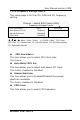
7.4.9. Frequency Voltage Control
This setup page is for the CPU, DDR and PCI frequency
setting.
Phoenix - Award BIOS Setup Utility
Frequency Voltage Control
Item Help CPU Clock Ratio (8X)
Auto Detect PCI Clk (Enabled)
Spread Spectrum (Disabled)
CPU Clock (100MHz)
Menu Level
u CPU CLOCK RATIO
This item allows you to select CPU Clock ratio.
The choice:
u AUTO DETECT PCI CLK
This item allows you to select auto detect PCI Clock.
The choice: Enabled or Disabled.
u SPREAD SPECTRUM
This item allows you to Enabled/Disabled the spread
spectrum modulate.
The choice: Enabled or Disabled.
u CPU CLOCK
This item allows you to select CPU frequency.