
User`s manual

User Manual version 2305
APOLLO 120/150 IV
5-46
5.3. Installing the DDR Memory Module
The APOLLO 120/150 IV system control board provides 1 x
184-pin DDR socket, able to support DDR memory from
128MB up to 1GB. To install the memory module, follow the
instructions below.
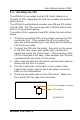
1. Find the 184 pin DDR socket on the motherboard
2. There are two white eject levers at each end of the DDR
socket. Push them outward until they separate from the
two vertical posts.
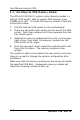
3. Holding the memory module with the notch on the upper
right corner, then insert the memory module into the
DDR socket at 90° angle.
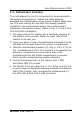
4. Push the two eject levers toward the vertical posts until
they click into place. The memory module is now
upright.
The system is able to auto detect the new memory size and
there is no need to change the system configuration after
installation.
Make sure that the memory module you are using can handle
the specified DDR MHz. Inadequate memory module will
make the computer unable to boot up.