
User`s manual


User Manual version 2305
APOLLO 120/150 IV
5-52
5.8. LCD Module Assembly
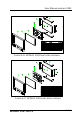
Figure 5-8 and 5-9 illustrate the way to assemble the
APOLLO’s LCD module.
The LCD does not fix to the main system directly. Rather, it is
to be fixed to a LCD holder, then to the main system. The
assembly of APOLLO 120 LCD module slightly differs from
that of APOLLO 150.
APOLLO 120
1. Refer to Figure 5-8. There are two LCD brackets (2) & (3)
used to fix to the LCD panel (1) to the LCD holder (11)
from the up & down sides.
2. Fix the LCD to the LCD holder with four PMS 3*8 screws.
3. The standard LCD used in APOLLO 120 is SANYO
MXS121022010 or its equivalent. It is a TTL interface
LCD. As the motherboard onboard display is an LVDS
controller, to connect the onboard LVDS controller to the
LCD, an LVDS receiver board is needed.
4. Plug the LVDS board to LCD connector located at the
rear side of the LCD panel first.
5. The APOLLO 120 LCD cable is a DF14-20 to DF11-30
(2*15) cable with around 35 cm in its length. Insert the
DF14-20 end of the cable into the opening at the rear
side of the LCD holder and have it firmly plugged to the
DF11-20 pin connector on the LVDS board.
6. Attach the insulator (10) to the invertor (9).
7. The invertor cable (8) is a 4-pin to 4-pin cable with wafer
connectors at both sides. Connect the one end to
invertor first. The other end is for later connection to the
INV1 on the motherboard.
8. Connect the pink-white high voltage wires from the LCD
to the invertor.
9. The invertor module is to be fixed at the right middle
side of the LCD holder with the up side down.
10. For APOLLO 120, the IR/LED board (2) is to be fixed to
the lower side of the LCD holder.
11. The two speakers are to be fixed to the right and left
sides of the IR/LED board. The speaker wires are to be
connected to the 2-pin header on the IR/LED board.