
User`s manual


User Manual version 2305
APOLLO 120/150 IV
5-58
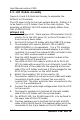
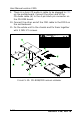
9. There is a 4-pin CD audio-in cable to be plugged to CD1
on the motherboard. Connect the other end of the
CD-Audio cable (6) to the 4-pin black pin connector on
the CD-ROM board.
10. Connect the other end of the FDD cable to the FDD1 on
the motherboard.
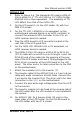
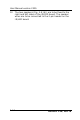
11. Fix the whole unit to the chassis and fix them together
with 3 FMS 3*5 screws.
RISER B
ºÏ¾÷ªþ¥ó
CDROM/FDD ²Õ«~
slim CDROM
CDROM ¶¡¹j¬W2.5mm
MODULE CDROM-FDD
CDROM CABLE 150mm
SOUND CABLE P/H 2.54 120mm
slim FDD
FDD ³n±Æ26pin 130mm
ºÏ¾÷¬[
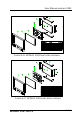
FIGURE 5-10: CD-ROM/FDD MODULE ASSEMBLY