
How-To Guide


French 7
Welcome to your MagicKeyboard
Your MagicKeyboard has a rechargeable
battery and uses Bluetooth® technology to
connect wirelessly to your Mac.
This guide shows you how to use your
MagicKeyboard, including pairing, setting
up Touch ID, customization, and recharging
the battery.
Update your software
To use your MagicKeyboard and its full
range of features, update your Mac to the
latest version of macOS.
To update to the latest version of
macOS, choose Apple menu >
SystemPreferences > SoftwareUpdate
to see if there are updates. Follow the
onscreen instructions to update macOS.
Set up your MagicKeyboard
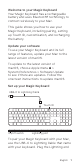
Lightning port
USB-C to Lightning Cable
On/off switch
Touch ID
To pair your MagicKeyboard with your Mac,
use the USB-C to Lightning Cable that came
with your keyboard. Plug the Lightning end