
User's Manual

15
105
Find places
WARNING: For important information about navigation and avoiding distractions that could
lead to dangerous situations, see Important safety information on page 193. See also Privacy on
page 44.
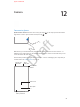
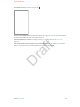
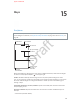
Choose the view,
drop a pin, or
show traffic.
Choose the view,
drop a pin, or
show traffic.
Tap a pin to display
the banner.
Tap a pin to display
the banner.
Quick driving
directions
Quick driving
directions
Get more info.
Get more info.
Current location
Current location
Enter a search.
Enter a search.
Show your
current location.
Show your
current location.
Get directions.
Get directions.
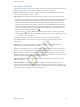
Move around Maps by dragging the screen. To face a dierent direction, rotate with two ngers.
To return to north, tap the compass in the upper right.
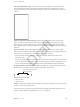
Zoom in or out. Double-tap with one nger to zoom in, and tap with two ngers to zoom
out—or pinch open or closed. The scale appears in the upper left while zooming, or if you touch
the screen with two ngers. To change how distance is shown (in miles or kilometers), go to
Settings > Maps.
Find nearby attractions, services, and more. Tap the search eld, then choose an interest like
Food, Shopping, or Fun.
Search for a location. Tap the search eld. You can search for a location in dierent ways. For
example:
•
Intersection (“8th and market”)
Maps
Apple Confidential
Draft