
User's Manual

Contents
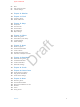
9 Chapter 1: iPhone at a glance
9 iPhone overview
10 Accessories
11 Multi-Touch screen
11 Force Touch
12 Buttons
14 SIM card
15 Status icons
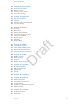
17 Chapter 2: Get started
17 What’s new
17 Apps and app enhancements
17 Assistence, when and where you need it
17 Under-the-hood improvements
18 Set up iPhone
18 Connect to Wi-Fi
19 Connect to the Internet
19 Apple ID
19 iCloud
21 Set up other mail, contacts, and calendar accounts
21 Manage content on your iOS devices
22 Connect iPhone to your computer
22 Sync with iTunes
23 Date and time
23 Apple Watch
23 International settings
24 Your iPhone name
24 View this user guide on iPhone
24 Tips for using iOS 9
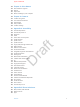
25 Chapter 3: Basics
25 Use apps
28 Proactive assistant
28 Continuity
29 Customize iPhone
31 Type text
34 Dictate
35 Voice Control
35 Search
36 Control Center
37 Alerts and Notication Center
38 Sounds and silence
2
Apple Confidential
Draft