
Computer Personal Computer User's Manual
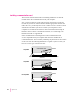
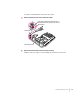
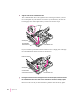
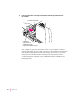
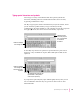

3Align the card over the communication slot.
The communication slot is the rightmost slot on the logic board as you face
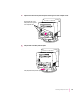
the vertical plate. If your card has a hook on it (as shown here), be sure the
hook engages the vertical plate when you insert the card in step 4.
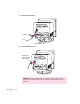
If your card has a prominent external connector on it, simply pass it through
the communication card access hole as shown here.
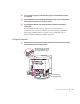
4Passing the external connector through the hole in the vertical plate, insert the card into
the communication slot. Press down on the card until the connector is solidly in place.
Don’t force the card. If you meet resistance, pull the card out and try again.
Communication slot
Vertical plate
External connector
Communication
card access hole
Communication slot
Vertical plate
Hook
Communication
card access hole
132
Appendix B