
Computer Personal Computer User's Manual


Reviewing the basics
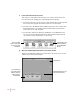
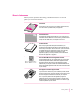
You can use the following illustrations to review the elements you use on your
screen to do work with your computer.
Menus
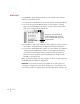
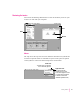
The strip across the top of the screen is called the menu bar. The symbols and
words in it represent menus of commands. To open a menu, place the pointer
on the symbol or word for the menu and press the mouse button.
15
Getting Started
Menu
Window
Icons
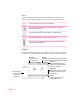
Application menu
You can have several
applications open at once.
To see which program is active
or to switch from one program
to another, use this menu
(called the Application menu).
Guide menu
To find an answer to a question,
look in the Guide (
h
) menu.