
Computer Personal Computer User's Manual
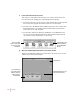


Turning the computer off
To turn the computer off using the Power key on the keyboard, follow these
instructions:
1If the computer is in sleep mode, press the Power key (or any other key on the keyboard
except Caps Lock) to wake it.
2Press and hold the Power key on the keyboard for about 2 seconds.
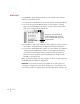
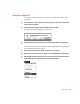
The following dialog box appears on the screen:
3Press the Return key on the keyboard (or click the Shut Down button in the dialog box).
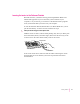
You can also turn off your computer by choosing Shut Down from the Special
menu. Detailed instructions follow.
1Move the tip of the arrow to the Special menu at the top of the screen.
2With the tip of the arrow on the word “Special,” press and hold down the mouse button.
3While holding down the mouse button, move the arrow down the list of choices until the
words “Shut Down” are highlighted, then release the mouse button.
17
Getting Started