
Computer Personal Computer User's Manual


47
Using Programs and Backing Up Disks
Installing programs from a floppy disk
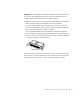
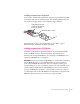
In most cases, you’ll install an application program on your internal hard disk
from floppy disks that contain the program. The following illustration shows
how to insert a floppy disk into your computer’s floppy disk drive.
For instructions on how to eject floppy disks, see the “Disks” topic of
Macintosh Guide, available in the Guide (h) menu.
Installing programs from a CD-ROM disc
Sometimes you’ll install an application program on your internal hard disk
from a CD-ROM disc that contains the program. (For instructions on
inserting and ejecting CD-ROM discs, see “Inserting a CD-ROM Disc” and
“Ejecting a CD-ROM Disc” in Chapter 5.)
IMPORTANT
Never copy an entire CD-ROM disc to your hard disk. (Don’t drag
the CD-ROM disc’s icon to your hard disk.) When you open programs on
some of the CD-ROM discs that came with your computer, you may get a
message telling you to copy or install the program onto your hard disk. If you
get this message, double-click the CD-ROM disc’s icon to open it, and then
copy the CD-ROM disc’s program to your hard disk. Look for any “read me”
or “information” files on the CD-ROM disc for instructions. Copying the CD-
ROM disc itself will take up a lot of memory on your hard disk.
Insert the floppy disk, metal
end first, into the floppy disk
drive of your computer.