
Computer Personal Computer User's Manual

3Push the tray in, or press the Open/Close button, to close the tray.
4Hold down the C key on your keyboard while you choose Restart from the Special menu.
Continue to hold down the C key until you see the “Welcome to
Macintosh” message.
Checking for damage on your hard disk
You can test a hard disk for damage with the Drive Setup program, which is on
the Macintosh Performa CD: Performa Software that came with your computer.
1 Start up your computer from the
Macintosh Performa CD: Performa Software
.
See “Starting Up From a CD-ROM Disc” earlier in this section.
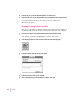
2 Click the Drive Setup icon in the Launcher to open the Drive Setup program.
3 In the list of drives, click the disk you want to test.
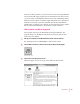
4From the Functions menu, choose Test Disk.
5When a message tells you that the testing is complete, click Quit.
86
Chapter 6