
Computer Personal Computer User's Manual

Initializing a hard disk
The hard disk inside your computer was initialized (formatted for use) at the
factory, so you shouldn’t need to initialize it. You need to initialize a hard disk
only if one of the following is true:
m You purchase an uninitialized hard disk from another manufacturer.
m Your hard disk is damaged and can’t be repaired.
If a hard disk needs to be initialized, the disk’s icon does not appear on the
desktop when you start up the computer using another disk.
You initialize your internal hard disk using a program called Drive Setup,
which is on the Macintosh Performa CD: Performa Software that came with
your computer.
1 Start up your computer from the
Macintosh Performa CD: Performa Software.
See “Starting Up From a CD-ROM Disc” in the section “Repairing a
Damaged Disk,” earlier in this chapter.
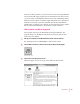
2 Click the Drive Setup icon in the Launcher to open the Drive Setup program.
WARNING
Initializing a disk erases any information that may be on it.
Before you initialize a damaged disk, try to repair it as described in
“Repairing a Damaged Disk” earlier in this chapter.
89
Troubleshooting