
User Guide


!
Check the Default Storage Engine of MySQL!
!
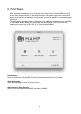
1. Open MAMP!
2. Start the servers!
3. Open Terminal.app (/Applications/Utilities)!
4. Enter the following line into the terminal and hit Enter:!
!
cd /Applications/MAMP/Library/bin!
!
5. Hit Enter !
!
./mysql --host=localhost -u root -proot!
!
6. Enter the following line into the MySQL prompt and hit Enter:!
"
USE information_schema;"
!
7. Enter the following line into the MySQL prompt and hit enter:!
"
SELECT * FROM engines;"
!
8. A table with the Storage Engines of MySQL will show up. Inside the Support column the #
Default Storage Engine has the value DEFAULT.#
#
#
!
9. Enter the following line into the MySQL prompt and hit enter:!
!
exit;!
!
!
!
!
!
10