
User Guide


II. First Steps!
!
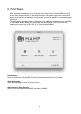
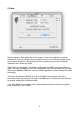
After successful installation you can launch your local servers. Start MAMP and click
on the Start Servers button. In the status display in the upper right corner, the launch
status of the servers is displayed. If necessary, you will be asked for your administrator
password.#
The web server (Apache) starts by default on port 8888, the database server (MySQL)
on port 8889. When calling your web page in a web browser, you must enter the
Apache port at the end of the URL, e.g.: http://localhost:8888!
!
!
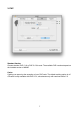
Preferences …!
Set your preferences for MAMP. See the Preferences section for more details.!
!
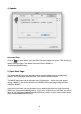
Open Start page!
Open the start page of your local web server.!
!
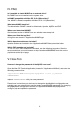
Start Servers / Stop Servers!
Start or stop the Apache and MySQL services of MAMP.!
!
!
4