
Specifications


13
All Button Control Panel Installation
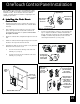
Prepare Control Panel Site.
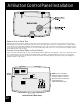
With the aid of the homeowner, find the best location for the Control Panel. To ensure the Control Panel is level, hold the
Mounting Bracket against the wall and mark the top inside of the upper right screw hole. Using this mark as a guide, place a
level against the mounting wall and draw a horizontal line 4¼ inches to the left. Now use the Bracket as a template to mark
holes for mounting screws (lining up the holes to the horizontal line). Drill ¼" holes for each screw and insert plastic anchors.
Mount Bracket and secure in place.
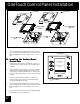
Connect Control Panel Cable to Control Panel.
Pull Control Panel Cable through the hole in the Mounting Bracket. Strip back cable jacket 6". Remove the terminal bar from
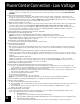
the Control Panel P.C. Board, and wire Control Panel cable according to the wiring diagram on the back of this manual.
Connect the terminal bar to the Control Panel. Mount the Control Panel by putting the top in place first, then swinging the
bottom in until the snap catches.
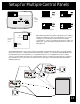
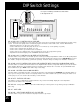
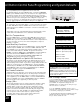
NOTE: If you are installing
multiple Indoor Control Panels,
you must "address" each one
differently. Refer to instructions
on following page for
additional Control Panel(s).
Control Panel (Back View)
Multiple Control Panels
W2
W1
Cancel
Delay