
Specifications

27
AquaLink
®
RS Troubleshooting Quick Check List
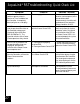
All LEDs on at Controller and
the part # and Rev letter are
displayed, but override
switches at the Power Center
do not operate at all.
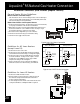
1. Damaged or improperly
installed PPD.
2. Damaged Power CenterPCB.
1. Check alignment of the PPD.
2. If PPD is installed correctly,
replace the Power Center PCB.
Some buttons do not operate
from the Controller, nor from the
Power Center override
switches.
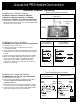
Wrong PPD chip installed at
the Power Center PCB.
Check part number and
revision letter by pressing the
Reset button at the Controller.
The second part number and
Rev. letter displayed is for the
PPD indicating which model.
System locked up. Microprocessor locked. Turn off power to system.
Disconnect battery and turn on
power. Reconnect battery and
reset time and date.
Symptom Problem Possible Solution
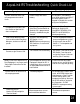
Power Center override
switches operate when in
Service or Time Out Mode, but
the Controller is completely
dead (no lights on, no display).
Power supply problem. Check connection of the outside
two wires (red and green) of the
four conductor cable.
If wired correctly, check the volt-
age between these two wires -
voltage should be 10 VDC.
All LEDs are on at Controller
and the part # and Rev letter of
the Controller software are
displayed (either 6553 Rev
B01 or 6700 Rev C). The
override switches at the Power
Center operate as they should.
Controller is not communicating
with the Power Center PCB.
Check the two center wires
(black and yellow) of the four
conductor cable. Also check
the installation of the PPD on
the Power Center PCB; if it is
not seated properly the system
will not communicate.