
User manual



12
RC Receiver Mode
Introduction
An ART3 in RC Receiver Mode enables conventional DMX fixtures to be controlled by the Astera
Remote Controls. That enables customers to control battery-powered Astera lights together with
conventional DMX fixtures.
Characteristics
- Receives data from ARC2 and ARC6 and ART3 in RC Transmitter Mode
- Can connect up to 32 third-party fixtures
- Can be used as standalone controller to control the connected fixtures
Setup of ART3
Set the ART3 to DMX Receiver Mode (see page 5). Daisy-chain the third-party fixtures which you
want to control to the ART3. The ART3 outputs 32 pixels so it can control 32 fixtures with 1 pixel each
or fewer multi-pixel fixtures. If you have more than 32 pixels you can use several ART3s that are set
to RC Receiver mode.
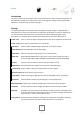
It is important to set the exact number of pixels that are connected to the ART3 so that effects get
displayed correctly. While in RC Receiver mode press the Enter button twice and use the + and –
buttons to select the number of pixels. Confirm with Enter.
As soon as the ART3 receives a new program the display will show this program which confirms that
it is receiving data.
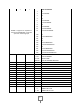
Users that are familiar with the Astera system can change or look up a number of other settings such
as defining Group or Set number, Program or Colors of the ART3. While in RC Transmitter mode,
press the Enter button and use the + and – buttons to choose among the settings. Confirm with Enter
and press the Back button to abort.
Apart from Auto Pixels a range of values can be set to control the connected third-party lamps
directly from the ART3 without the need for an ARC2 remote control. Refer to the ARC2 manual for
an explanation about these features.
Setup of third-party LED fixtures
The connected fixtures need to be set to 3-channel DMX (RGB). Alternatively they can be set to 6-
channel DMX where the first 3 channels are for RGB and the following 6-channels can be set to zero.
4-channel DMX, 7-channel DMX etc. are not supported. To check how to set your fixture to 3-channel
DMX, please refer to its manual.
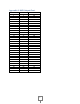
If you want to use more than 1 pixel, set the fixtures accordingly: pixel 2 should be DMX address 004,
pixel 3 should be DMX address 007 etc. up to address 94. For fixtures that use 6-channel DMX (see
paragraph above) the ART3 outputs data from Channels 97 onwards: pixel 1 = channel 97, pixel 2 =
channel 103, pixel 3 = 109. Please refer to DMX Output Chart on page 19.