
User manual


5
Operation Modes
The ART3 is a very versatile product and can be used to send or receive data. It can work with
wireless Astera lights or controllers as well as with conventional DMX fixtures from other companies.
Also, it can be used as an emergency remote control in case you forgot the ARC2 or ARC6.
Because of the many settings and purposes of the ART3 it is important to carefully check the desired
mode before starting to use it. Here is how you can find out:
Navigation through the menu
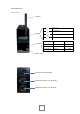
The navigation panel with its display and 4 buttons is used to navigate between the Operation Modes
and to change settings.
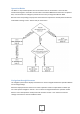
When the display shows the name of one of the 5 operation modes in capital letters or SETUP you
are in the top level navigation. Use the + and – buttons to navigate between the operation modes.
When in one of the operation modes press Enter and then use the + and – buttons to reach its
settings. Press Enter to confirm and Back to abort.