
User manual


6
Operation
DMX Transmitter Mode
Introduction
The DMX Transmitter mode is for customers that want to send DMX data to Astera lamps and/or to
other ART3s that are set to DMX receiver mode. The DMX Transmitter simply transmits the DMX
protocol from a standard DMX controller such as Martin Lightjockey, GrandMA and computer-based
systems over the air to Astera lights and ART3s that are set to DMX Receiver. For this, the DMX Data
gets compressed.
Characteristics
- Works straight out of the box, all you have to set is the DMX addresses of the lights
- Establishes a constant link to the lights/ART3s it controls. If the link is interrupted the
lights/ART3 wont react correctly
- Range: 50-100m
- Transmits a limited amount of data, to get better results use several with different radio pins
at the same time (see bottom of page 7). The more channels you transmit the lower the
refresh rate.
Setup of ART3
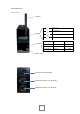
When you buy a new ART3 or when you Factory Reset the ART3 it is already set into DMX
Transmitter mode. All you have to do is connect it to an AC power socket and to your DMX Controller
and it will automatically start transmitting as soon as it receives DMX data which is indicated by a
flickering blue light and the display showing TRANSMITTING...
While in the DMX Transmitter mode you can press the Enter key then + key to select the minimum
and maximum addresses of this ART3, this is useful when using several ART3s at the same time. Also,
you can find information about the ART3 by pressing the enter key. Press the menu button to go
back.
Setup of lamps
With the ARC2 or inside the menu of lights with keyfoil and buttons you can set the following:
DMX Address:
New lights or lights that have been factory reset are set to DMX address. You can set other DMX
addresses for any wireless Astera light:
Lights without display and on/off button (AL1, AL3, AL7-L):
Take the ART3 press the – button until you see Setup and confirm with Enter. Choose DMX
Setup > DMX Address, choose the desired address and press Enter. All lamps in range will
start blinking white once a second. Press the on/off buttons of the lamps you want to set to
this address. Alternatively you can use the ARC2 to send addresses to lights, the ARC2 Quick
Start Guide explains this process well.