
User`s guide
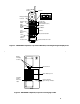
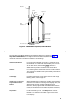
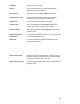
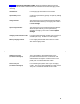

Figure 2, Top View of Charging Cradle, shows the following features (the list
begins with the Handset Hook and continues clockwise around the charging cradle
drawing):
Handset Hook For hanging up the handset in the cradle.
Spare Battery Cover Covers the spare battery garage. It opens by sliding
to the left.
Charge Indicator This green LED on the cradle’s faceplate indicates
when the handset battery is charging. This LED is
labeled Charge.
Spare Charge Indicator This green LED on the cradle’s faceplate indicates
when the spare battery (in the spare battery
garage) is charging. This LED is labeled Spare
Charge.
Charging Cradle Extension Label For writing the extension number (using a pencil or
erasable pen only). Do NOT use a felt-tip pen.
Battery Charging Contacts For charging the handset when contact is made
with the charging cradle.
Modular Power Pack
(not shown in the figure)
This rechargeable, replaceable battery pack
provides at least three hours of "talk time" and
should hold its charge for at least 22 hours. The
power pack is located inside the cradle.
Power Cord Jack
(not shown in the figure)
For connecting the power cord to your charging
cradle. This cord is then plugged into a wall outlet.
This jack is located on the back of the cradle.
5