
User`s guide





Phone Features
The following features can be used immediately no matter which communications
system your MDW 9000 telephone is behind.
Note: For information about the Display Information or Out-of-Range Indications
the MDW 9000 telephone provides, see ‘‘Phone Features’’ in the section, What the
Features Do.
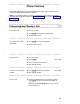
Answering and Placing a Call
To answer a call 1 Pick up handset
2 Press
On/Off on the front of the handset
3 Speak to other party
To answer a call using
the headset
1 Press
On/Off on top of the handset
2 Speak to other party
To place a call 1 Pick up handset
2 Press
On/Off
[dial tone]
3 Press an available line button
4 Dial desired number
To place a call using the
headset
1 Press
On/Off on top of the handset
[dial tone]
2 Dial desired number
To end a call 1 Place the handset back in the charging cradle or
press
On/Off to turn the handset or headset off
or
press the (unlabeled) Drop button if you want to
place another call
11