
User`s guide
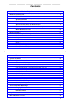
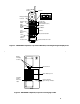
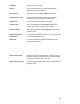

Hold Button For placing a call on hold.
Dial Pad The standard 12-button pad for dialing telephone
numbers and accessing features.
Feature Button The Feature button (labeled Feat) is NOT used.
Handset Extension Label For writing the extension number (using a pencil or
erasable pen only). Do NOT use a felt-tip pen.
Headset Jack For connecting the headset to the handset.
Transfer Button The Transfer button (labeled Trans) enables you to
transfer calls to other extensions or numbers.
Conference Button The Conference button (labeled Conf) is used to set up
conference calls.
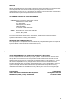
Handset (and Headset)
On/Off Button
For turning the handset on and off. (It can also be used
to turn the headset on or off.)
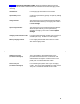
Mute Button For turning off the microphone associated with the
handset or the headset.
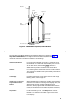
Volume Control Switch Adjusts the receiver volume (higher or lower) when the
handset is off-hook and adjusts the ring volume (higher
or lower) when the handset is on-hook.
Battery Charging Contacts For charging the handset when contact is made with the
charging cradle.
4