
Instruction manual

MERLIN LEGEND Communications System Release 5.0
Installation
555-650-140
Issue 1
June 1997
Installing the PC, CAT, or Printer
Page 5-4
Connecting a PC to the Control Unit
Connecting a PC More Than
50 Feet (15.2 m) Away
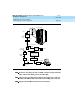
Use this procedure to connect a PC to the control unit when the distance is
50 ft. (15.2 m) or more.
NOTE:
If you are installing the PC in a different room than the control unit, make
sure that both locations have working wall outlets and wall jacks. Also
make sure that the building wiring has been connected so that the wall
jacks in each location connect to each other.
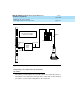
You need the following hardware for this procedure:
■ 355AF adapter
■ EIA crossover cable
■ Two Z3A2 Asynchronous Data Units (ADUs)
■ ADU crossover cable
■ 400B2 power adapter
■ 2012D transformer
■ BR1A-4P adapter and 102 connecting block or 103 connecting block
■ 248B adapter
■ 8-position wall jacks
■ 4-pair plug-ended cable
■ D8W cords
■ D6AP power cord
■ EIA-232-D cables