
Instruction manual

MERLIN LEGEND Communications System Release 5.0
Installation
555-650-140
Issue 1
June 1997
Installing the PC, CAT, or Printer
Page 5-11
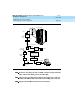
Connecting a Printer to the Control Unit
NOTE:
If you are installing the printer in a different room than the control unit,
make sure that both locations have working wall outlets and wall jacks,
and that the building wiring has been connected so that the wall jacks in
each location connect with each other.
You need the following hardware for the following procedure:
■ 248B adapters
■ 355AF, 355A adapters
■ 400B2 power adapters
■ D8W cords
■ D6AP power cords
■ D8AM modular crossover cable
■ M7U null modem cable (25-pin cable)
■ Z3A2, Z3A4 ADUs
■ 2012D transformer
■ Z200A EMI filter
To connect a CAT printer on a different AC outlet, first make the connections at
the control unit, then at the printer.