
User`s guide

Accessing Items in Lists 111
Synapse SB67030/031 Deskset & Accessories User’s Guide Back to Contents
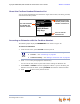
About the Cordless Handset Extension List
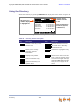
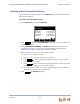
You can access the Extension list illustrated in Figure 38 from Idle, Live Dialing, Transfer,
and Conference Setup modes.
Figure 38. Extension List Functions
Accessing an Extension with the Cordless Handset
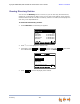
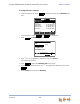
The following steps display the EXTENSION screen shown in Figure 38.
To access an extension:
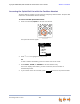
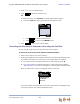
1. From the Idle screen, press OPTIONS and then press 4.
2. Press
or until you highlight the desired entry.
You can use the dial pad for a quick search when viewing the Extension list.
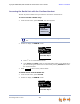
3. Press SELECT or PHONE to dial the highlighted number. If you are accessing the
Extension list from Idle mode, pressing SPEAKER also dials the selected number.
4. Press to return to the previous screen.
Amy Lee
203
Douglas Lewis
Edgar Williams
Gary Keys
EXT ENSI ON 1/16
EXI T
First and Last Name
(if available) and
Extension number
Highlighted extension
number position/total
number of extensions
Press to exit the
Extension list
You can also access the EXTENSION screen from the following:
Transfer — See “Transferring” on page 85.
Conference Setup — See “Making a Conference Call” on page 87.
EXIT