
User`s guide

Accessing Items in Lists 112
Synapse SB67030/031 Deskset & Accessories User’s Guide Back to Contents
Accessing the Quick-Dial List with the Cordless Handset
The Quick-Dial list provides up to six entries for frequently called numbers. The Quick-Dial
entries are not associated with the Directory.
To access and dial Quick-Dial entries:
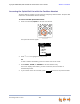
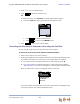
1. Press and hold MUTE/QUICK for at least two seconds.
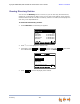
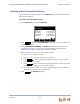
The Quick-Dial entries appear.
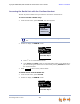
2. Press
or to highlight the entry to call.
OR
To dial a number immediately, press the number next to the name.
3. Press SELECT, PHONE, or SPEAKER to dial the selected entry.
The screen displays the number, you hear a dial tone, and the number is
automatically dialed.
4. If you choose not to dial a number, press to return to the previous mode.
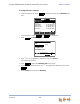
QUICK
1 -- Kate
2 -- Enrico
3 -- Doug
4 -- <Empty>
5 -- Titan
6 -- <Empty>
1/6
EXIT
EXIT