
User`s guide

Directory 115
Synapse SB67030/031 Deskset & Accessories User’s Guide Back to Contents
C HAPTER
6
D
IRECTORY
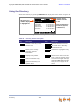
The Synapse system provides three Directory lists. By default, the system displays entries
from all three lists when you press DIRECTORY (or you press DIR on the optional
SB67040 Cordless Handset). See “Viewing Directory Entries” on page 117 to learn how
you can limit this display to one of the three lists.
Personal — You can add, edit, and delete up to 50 entries in this Personal
directory from the Deskset or the WebUI (referred to as “Extension Directory” on
the WebUI). These entries are available only at your extension.
System — This public directory is created and maintained by the system
administrator. You can view and sort this directory, but you cannot modify it.
Extension — This is a list of all extensions in the system. It contains the Display
Names that the administrator entered and the extension number of each
Deskset. You can view and sort this directory, but you cannot modify it.
“Using the Directory” on page 116
“Viewing Directory Entries” on page 117
“Creating a New Personal List Entry” on page 119
“Editing a Personal List Entry” on page 120
“Storing Directory Entries from the Call Log or Redial List” on page 121
“Sorting Directory Entries” on page 123
“Accessing the Directory with the Cordless Handset” on page 124.