
User`s guide

Directory 116
Synapse SB67030/031 Deskset & Accessories User’s Guide Back to Contents
Using the Directory
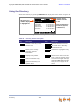
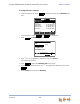
Access the Directory by pressing DIRECTORY to display the screen shown in Figure 39.
Figure 39. Directory Screen Description
Table 20. Directory Screen Description
Key Description Key Description
Creates a new entry in the
Personal list.
Switches between first and
last name sort in Directory
and Extension list.
Allows you to change
previously entered
information.
Deletes the highlighted entry.
Displays entry details. Moves to the next set of soft
keys. If this key appears, there
are more than eight soft keys
available. More 1/3 indicates
that you are on page one of
three.
Dials the selected entry.
Opens the Directory List
Options menu.
Mor e 1/3
Use or to scroll or use dial pad
f or quick search.
Quick
Dial
ABC Accountants Personal
9-503-555-0194
Amy Lee 203
Angela Martin 9-1-732-555-7318
Davis Caterer 9-1-317-555-0129
Charlie Johnson 9-1-888-883-2445
David Carter 9-1-443-555-0625
New
Directory 1/48
LastNme Call
Full name and
number displayed
in highlight bar
Position in list/
number of items
in list
Entry classification
(Personal, System,
or Extension)
New
FirstNme
LastNme
Edit
Delete
Details
More
Call
List