
User`s guide

Directory 119
Synapse SB67030/031 Deskset & Accessories User’s Guide Back to Contents
Creating a New Personal List Entry
You can add up to 50 personal entries to the Directory. These personal entries are only
visible at your extension.
To create a new Personal list entry:
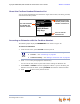
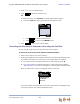
1. Press DIRECTORY to display the Directory.
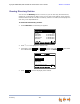
2. Press to display the Personal Entry screen with the cursor positioned in
the First Name field.
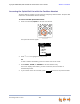
3. Edit the First Name, Last Name, and Phone # fields using the dial pad. See
“Deskset Dial-Pad Entry” on page 23. The name text fields are limited to 20
characters each and the number field is limited to 32 digits.
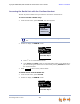
4. When editing the entry, you have the following options:
Press or to move the cursor.
Press or to move to the previous or next field.
Press to erase the highlighted character if there is one, or else the
character before the cursor.
Press to insert a two-second pause into the phone number. The pause
appears as a P in the field and is counted as a digit.
For outside phone numbers, enter a 9, or whatever digit, if any, that must be
dialed first to indicate this is an outside call.
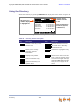
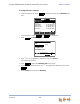
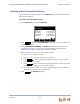
5. Press . The Directory appears.
Mor e 1/3
Use or to scroll or use dial pad
f or quick search.
Quick
Dial
ABC Accountants Personal
9-503-555-0194
Amy Lee 203
Angela Martin 9-1-732-555-7318
Davis Caterer 9-1-317-555-0129
Charlie Johnson 9-1-888-883-2445
David Carter 9-1-443-555-0625
New
Directory 1/48
LastNme Call
New
Backspc
Pause
Save