
User`s guide

Voicemail 130
Synapse SB67030/031 Deskset & Accessories User’s Guide Back to Contents
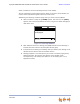
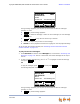
Select a mailbox to access the messages stored in that mailbox.
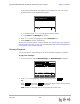
The list of messages in that mailbox appears. When you access a Group Mailbox, the
name of the Group Mailbox appears at the top of the screen.
Additionally, the following conditions apply when you access a Group Mailbox:
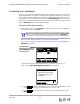
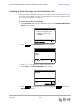
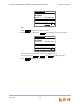
When a mailbox is nearly full, [<5 Min] appears, and when it is full, [FULL]
appears next to that Group Mailbox as shown in Figure 44. Delete messages to
make more room.
Figure 44. Full Group Mailboxes
After someone listens to a message, the [NEW] indicator for that message is
removed from the screens of all participants of that group.
If someone else is listening to a message when you delete it, the message is not
deleted until the listener exits the Voicemail session.
Message playback is not interrupted if you receive a call while playing Group
Mailbox Voicemail. The incoming call appears on the Deskset screen
accompanied by a call-waiting tone. (There is no call-waiting tone in Line
Appearance mode.)
Press or to move highlight, then
press SELECT.
[1 New , 6 Old] Personal
[FULL] Sales
Quick
Dial
Messages
[<5 Min] Support