
User`s guide

Voicemail 131
Synapse SB67030/031 Deskset & Accessories User’s Guide Back to Contents
Accessing Your Messages
Access to your messages is different depending on whether or not you have access to
any Group Mailboxes, and whether you have enabled Voicemail distribution. If you do not
have access to a Group Mailbox, and you have not enabled Voicemail distribution, you
can access just your new messages by selecting # New Messages on the Idle screen.
A list of your new messages appears. You can also access all messages (old and new) by
pressing MESSAGES. A list of all messages appears.
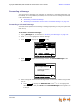
To access an entry from Voicemail:
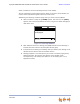
1. From the Idle screen, press MESSAGES. If necessary, use the dial pad to enter your
user password and press SELECT.
The screen that appears depends on your system configuration.
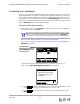
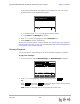
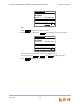
If you do not have Voicemail Distribution enabled or access to a Group Mailbox, the
Messages list appears.
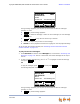
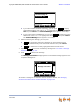
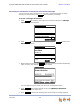
If you have enabled Voicemail Distribution (see “Voicemail Distribution” on
page 211), the Leave New Message or Listen screen appears.
Press to create a message to send to a Voicemail Distribution List. See
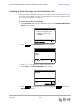
“Sending a New Message to a Distribution List” on page 138.
Press to view the Mailbox List (if you have Group Mailboxes), or the
Messages list.
Once you have entered your password, you do not have to enter it again
while you are reviewing messages. However, if you exit the Messages
screen, you will need to enter your password to access the Message list.
Press f or next or for previous
message.
Press f or next or for previous
message.
Press f or next or for previous
message.
Messages 1/3
Graham Bell 10:17a
232-555-0176 Feb 25
Private 8:05a
Mary Williams Feb 14
Press f or next or for previous
message.
Quick
Dial
Play Mor e 1/3DelMs g Call
“New Messages”
appears when you select
# New Messages from
the Idle screen.
Press Lv Msg to record a new message
or Listen to rev iew y our messages.
ListenLvMsg
Quick
Dial
Do you wish to leave a new
message or listen to your
messages?
Messages
LvMsg
Listen