
User`s guide

Voicemail 132
Synapse SB67030/031 Deskset & Accessories User’s Guide Back to Contents
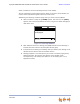
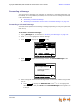
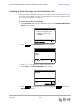
If your system administrator has assigned a Group Mailbox to you, a list of your
Personal Mailbox and Group Mailboxes appears.
a. If necessary, press
or to highlight the desired Mailbox.
b. Press SELECT. The Messages list appears.
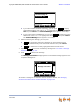
2. Press
or until you highlight the desired Messages entry.
3. Press CANCEL to exit the Voicemail list.
To view your Voicemail with the Cordless Handset, see “Accessing Personal Voicemail
with the Cordless Handset” on page 145. Voicemail Distribution and Group Mailboxes are
not supported on the Cordless Handset.
Message Playback
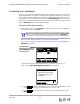
You can play either a single message or all of the Voicemail messages in a Mailbox.
To play new messages:
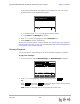
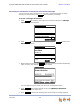
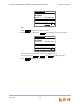
1. On the Idle screen, select # New Messages. The New Messages list appears.
2. Press
or to highlight the desired message, then press .
OR
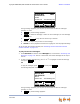
Press , then press . All messages begin to play, starting with the
oldest. There is a short beep between messages.
NEW appears on messages that are being played for the first time.
Press or to move highlight, then
press SELECT.
[1 New , 6 Old] Personal
[1 New , 12 Old] Sales
Quick
Dial
Messages
Press f or next or for previous
message.
Press f or next or for previous
message.
Press f or next or for previous
message.
Graham Bell 10:17a
232-555-0176 Feb 23
Private 8:05a
Press f or next or for previous
message.
Quick
Dial
New Messages 1/2
Play Mor e 1/3DelMs g Call
Play
More 1/3
PlayAll